Configure iOS and iPadOS Auto-Updates in the Library
KACE Cloud allows administrators to quickly create iOS and iPadOS Auto-Update Configurations to ensure your supervised iOS or iPadOS devices run the latest software. These configurations are covered by your base KACE Cloud license. You can easily find them in the Security Library. Use these configurations to, for example, install the iOS and iPadOS updates with the next available minor update or the next iOS and iPadOS version.
When you create iOS and iPadOS Auto-Update Configurations in the Security Library, you can associate them with applicable target devices either by linking them to policies or applying them directly. For details, see Manage iOS and iPadOS Auto-Updates on devices.
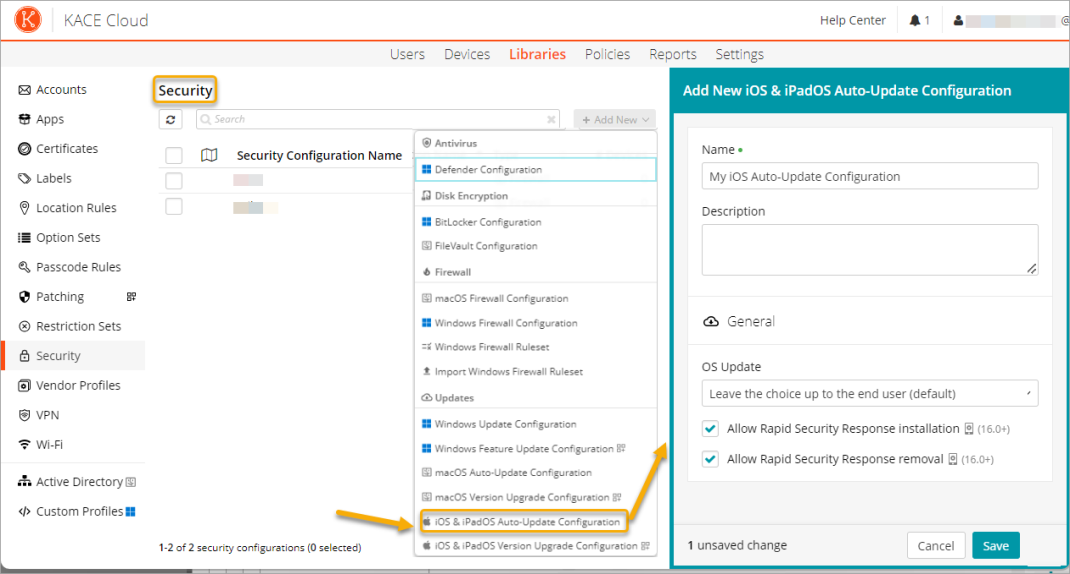
To create or edit an iOS and iPadOS Auto-Update Configuration:
- Select the Libraries tab in top navigation.
- Click Security.
- Complete one of the following steps:
- To create a new iOS and iPadOS Auto-Update Configuration, choose Add New > iOS and iPadOS Auto-Update Configuration.
- To edit an existing iOS and iPadOS Update configuration, select it in the list, and click Edit.
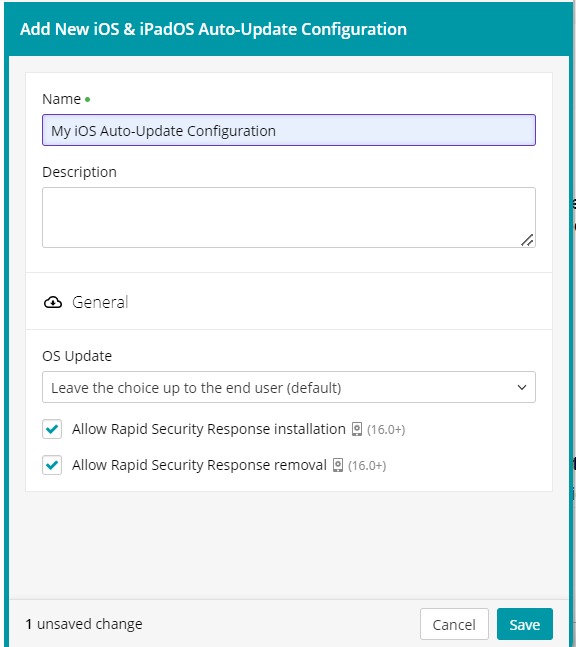
- In the configuration view that appears on the right, ensure the configuration has a unique Name, and provide a Description, as applicable.
- For each configuration setting that you want to apply to associated devices, select it in the list, or click the appropriate check box.
For example:
- To install the available iOS and iPadOS updates with the next minor update, click OS Update, and select Allow update to latest minor version.
- If your supervised iOS or iPadOS devices are running version 16.0 or later and you want to allow the installation and removal of iOS Rapid Security Response updates, select the applicable check boxes.

NOTE: Ability to manage iOS Rapid Security Response updates was previously offered through KACE Cloud Restrictions. This is now only possible through iOS and iPadOS Auto-Updates. For more information about KACE Cloud Restrictions, see Managing restrictions.
- When done, click Save.